
Create an API key
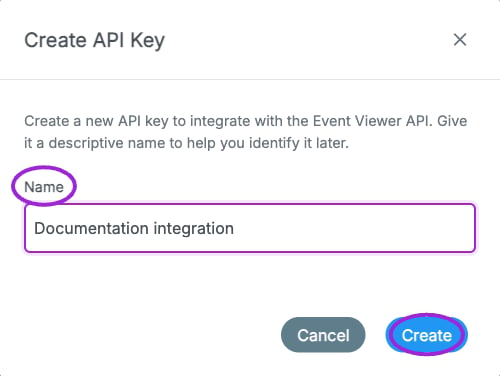
Account → Developers → Create API Key asks for a descriptive name. This is the form before creation; no key is generated or exposed in this example.
- Select the intended site in the dashboard.
- Open your account menu and choose Developers.
- Click Create API Key, enter a descriptive name, and click Create.
- Copy the key and store it securely before closing the dialog. The full key is only shown at creation.
- Send it from your server in the authorization header:
Supported scope
Use the event-creation endpoint for title, description, schedule, venue, image, organizer display name, and basic tickets. Configure advanced ticket rules, memberships, seating, communications, and event publication settings in the dashboard unless your integration has a separately agreed API contract. The reference does not define public event-list, delete, or webhook endpoints. Zapier and individual integrations have their own connection workflows.Handle errors
A400 response indicates invalid event input; inspect the message and correct it before retrying. A 401 indicates missing, invalid, revoked, or expired credentials. A 500 indicates a server-side failure. For an uncertain create result, inspect Events before retrying so you do not create a duplicate.