
Install the widget
- Create or select the Ticket Spot site for the website.
- Set up Brand identity and Widget design.
- In Design → Widget, select the widget in Editing Widget and click Installation. Choose Any Website. It supplies two code snippets for the selected widget.
- Under Step 1: Add Script to HEAD, copy the script into the website’s
<head>section or its custom head-code setting. Under Step 2: Insert Widget, copy the widget container into the HTML or embed area where the event list should appear. Both snippets are required, and the builder must permit custom scripts. - Publish the page and open the published URL. Some editors do not run scripts in their editing canvas.
- Check the event list, calendar filters, ticket selection, checkout, and confirmation on desktop and mobile.
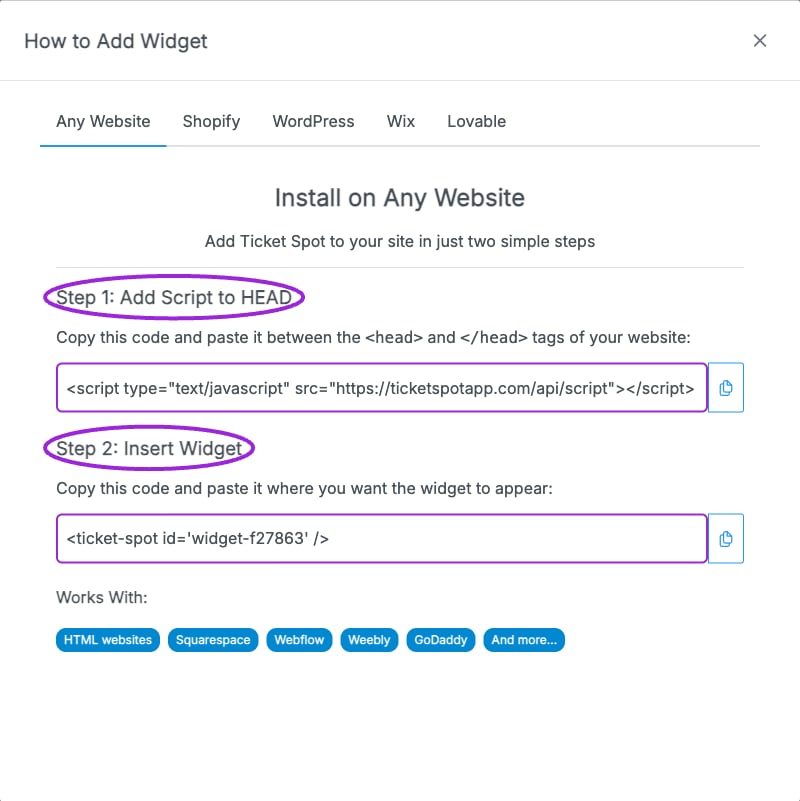
Any Website supplies two pieces: the script for the page head, then the widget container where the event list should appear.