
Booking toggle
Open Event Details → Capacity & Bookings and enable Exclusive booking per time slot. It is off by default. Once enabled, one confirmed order reserves the entire slot, even when the order contains several ticket types. Save the event to apply the setting.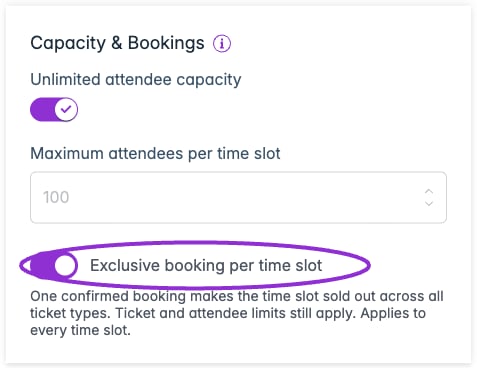
Exclusive booking reserves each time slot for one order. This example is configured in the Ticket Spot Demo account.
Before you start
Use Sell tickets with a Time-Based schedule and Ticket Spot checkout. Free and paid ticket orders can reserve a slot. The setting is off by default. It applies to every time slot in the event and is managed on the main event.Exclusive bookings require Ticket Spot checkout. Shopify, Ecwid, and other external store checkouts are not supported. A store-connected account can use this feature for events that use Ticket Spot checkout. Disconnect an existing external catalog product before enabling this option. Square payments inside Ticket Spot checkout are supported; Square catalog checkout is a separate integration.
Shopify ticket selection
For date and time-slot selection on a Shopify product page, enable Use Ticket Spot Selector in Shopify · Product linked → Product Page Settings. Older screens call this Use Advanced Ticket Selector. Add the Ticket Selector app block to the product’s assigned theme template, then save the settings and verify it appears on the storefront. Follow the Shopify Ticket Selector setup guide. The selector is required for Shopify’s time-slot booking interface. It still uses Shopify checkout, so enabling it does not remove the exclusive-booking checkout limitation above. The Santa example below uses Ticket Spot checkout.Enable exclusive bookings
- Open the main event’s editor and select Dates & Times.
- Choose Time-Based, then Add Times. Add your dates and available start/end times and create the schedule.
- Return to Event Details. Under Capacity & Bookings, turn on Exclusive booking per time slot.
- Configure ticket quantities and any combined attendee limit, then save the event.
- Preview the date and time selector and check that each visit has the intended start and end time.
One booking can include multiple tickets
A family might buy two child tickets and one infant ticket in the same order. All three belong to the chosen visit, and the entire slot becomes sold out once the booking is confirmed. Other time slots stay available.
Do not set the attendee limit to one just to reserve a slot for one family. That would prevent a family from buying several ordinary child tickets. For example, set a maximum of 6 if each visit can accommodate six ticketed children in total. Separate limits of six on two age-based ticket types would otherwise allow up to twelve.
If accompanying adults need to count toward the limit, give them tickets too. For tickets that reserve more than one place, see capacity used per ticket.